FOR GREGORY. He was not a VICTIM of ALZHEIMER'S DISEASE, he was a HERO!

PLEASE NOTE: Even though this blog is now dormant there are many useful, insightful posts. Scroll back from the end or forward from the beginning. Also, check out my writer's blog. Periodically I will add posts here if they provide additional information about living well with Dementia / Alzheimer's Disease.

Showing posts with label Security. Show all posts

Friday, October 11, 2013

Computer Passwords and Dementia or Death


Actually, you do need to share your passwords

No one stays healthy forever. At some point, your loved ones will need access to all of your accounts. You can make that job easier for them.
No reader questions today. Instead, I'm answering a question that someone should ask: In our password-protected digital world, how do you prepare for that inevitable day when you die or otherwise become incapacitated?
This is no small problem. When you're gone, or have otherwise lost the ability to remember or communicate, loved ones will need access to your email, contacts, bank accounts, and more. Without your pre-planned help, this can be quite a challenge.
[Email your tech questions to answer@pcworld.com.]
If you don't believe me, check out Google's page for Accessing a deceased person's mail. You have to gather up and snail-mail several items, including the death certificate (each official copy of which comes with a price). Part 2 of the process "will require you to get additional legal documents, including an order from a U.S. court and/or additional materials."
It would be a lot easier if someone you trust had your Google password--and other important passwords, as well.
One solution is to print out a hard copy of your passwords and store it in a safe deposit box. But you'd have to repeat the process every time you change a password. Not so good.
Here's a better one:
Pick someone who you really trust. Your spouse is an obvious choice. Or a very close friend or relative. It could even be your lawyer or accountant. For brevity's sake, I'll refer to this person as your executor.
You'll need a password manager--a program on your PC that allows you to store your passwords in an encrypted database. You should have a password manager anyway, as I explained in Manage passwords, and not just on the Web; I also recommend a couple of them in that article.
Your executor will need a password manager, as well, although it doesn't have to be the same one.
Give your executor a few key passwords--those for your Windows and mobile logons, your email account, and, of course, your password manager. Make sure they store these passwords safely in their own encrypted password manager.
If your relationship with the executor is personal rather than professional, add their key passwords to your manager, as well.
I've done that with my wife. Her Password Safe database contains a section called Lincoln. Mine contains one named Madeline.
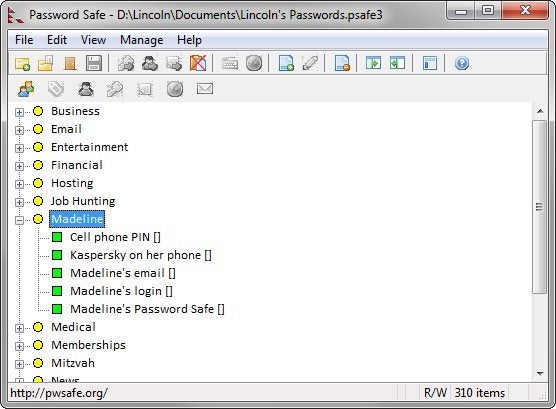
And, of course, when you change these few key passwords, make sure to put the new ones in the other person's password manager.

Saturday, January 22, 2011

Alert 1

Well, I've done it. "I've fallen and I can't get up." Read on...

As I have aged, I realize that I pass milestones that place me in my parent's generation. Over the years I would hear them talk about various conditions, changes, ways of looking at things and either I would hear them but not listen or I would write it off to "my parents being my parents." Now I understand.

Like my parents, we've moved to a condo and enjoy not having to maintain the house and grounds. We nap. We like to be at home at night and snuggle in. At restaurants we sometimes share entrees. Entertaining takes a toll so we do it easier or do it less. Pills are organized into our "S M T W T F S" boxes, white for day and blue for night. We do not eat too late at night. Pardon me ... but if we do not move our bowels we are aware of it. And so on...

Dealing with Gregory's Alzheimer's diagnosis has presented many other age related problems with which I have had no experience. But I am learning. For example, this week I ordered a Medical Alert System for the condo. If something was to happen to me (heart attack, crack on the head, broken hip) I am not sure that Gregory would be able to deal with the situation. When he is under stress, he temporarily looses even more of his abilities and I can picture myself laying on the floor trying to give him instructions or worse yet, passed out unable to give him instructions.

So now we have a large white box on my bedroom nightstand with its very loud speaker and bring red button (which lights up) marked EMERGENCY! I have a fob that I can wear around my neck that also has a red emergency button and I have a watchband button as well. Both activate the big box in the bedroom. I haven't taken to wearing the remote buttons when I am at home yet but probably need to get into the habit.

When I tested the system, within a minute of pressing the button someone came on the speaker box and asked (to be heard all through the condo unit) "Are you alright?"

I answered, "Yes I am testing the system."

"Am I speaking to Michael?" (On their records because I am listed as the "primary user."

"Yes."

"Is Gregory alright also?"

"Yes."

"We will mark this as a test of the system. Remember when ever you need help call us by pressing your emergency button. Thanks for using Alert 1."

Last night as I was drifting off I was musing about the service. Peace of mind is good.= but they forgot to ask about Mariah, our cat.